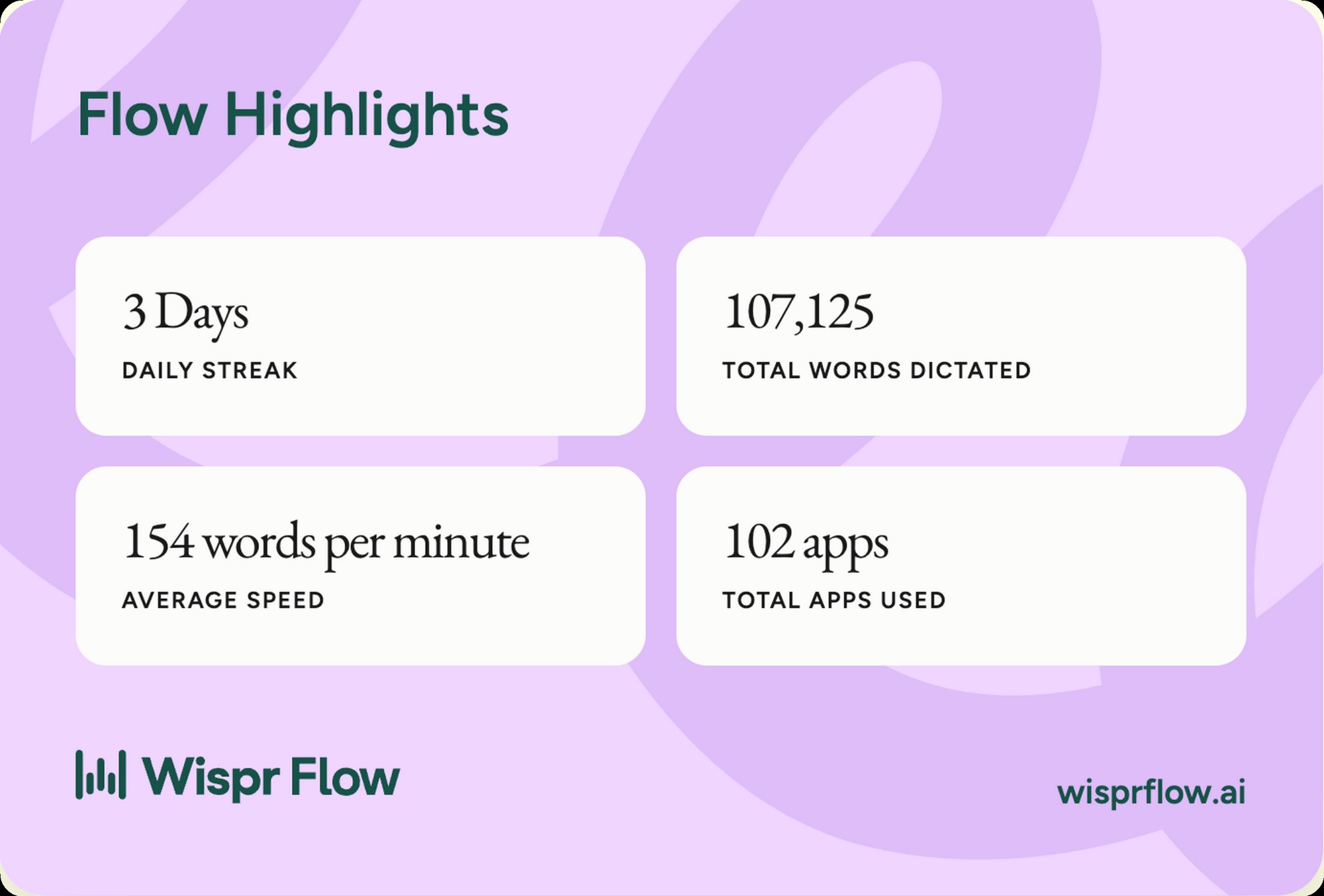
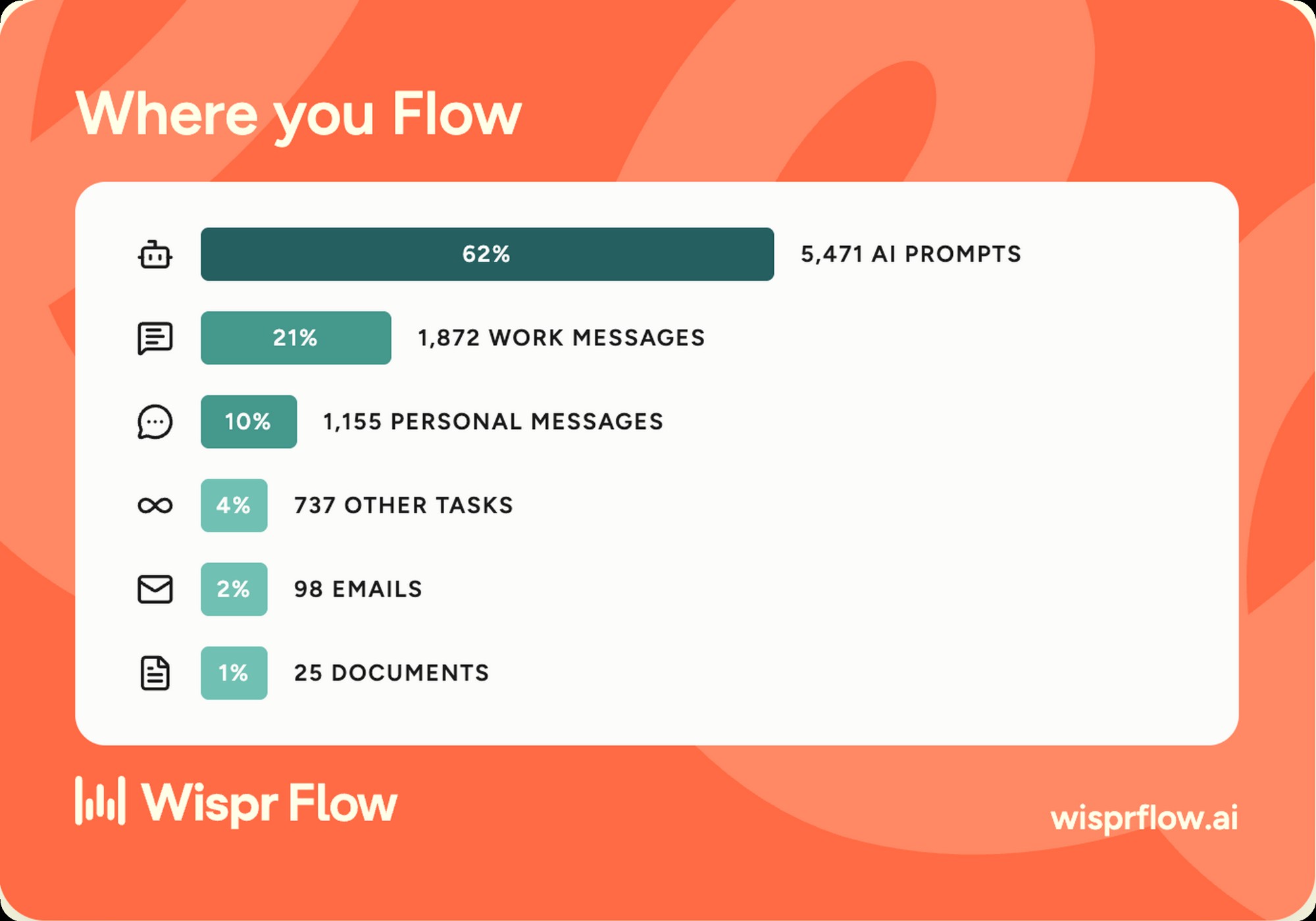
Most comparison posts about Mac dictation tools are written by people who installed both apps for an afternoon. This one isn't. I dictated 107,125 words through Wispr Flow over 90 days at 154 words per minute average, then ran Superwhisper in parallel for two weeks on the same workload. The two apps overlap on the surface and diverge in important ways underneath. The question this post answers isn't which is better in a vacuum. It's which one fits your work, your privacy posture, and your budget. The decision tree is below, the specs comparison after, and the verdict by criterion under that.
One quick note on testing methodology before we go. I run a performance marketing agency, so my real workload is heavy on Slack messages, Linear tickets, Gmail replies, Notion docs, and a constant stream of prompts into Claude Code and Cursor. That's the input mix both apps were tested against. I'm not stress-testing accents, dialects, or specialized vocabularies that aren't part of my daily work. If your input profile is academic transcription, medical dictation, or multilingual switching, the verdict below may not transfer cleanly. For working operators dictating into AI tools and business apps in US English, this is the comparison that mirrors your day.
Wispr Flow has a free tier that proves itself in a week
The fastest way to make this decision is to run Wispr Flow free for seven days on your real input mix. If you cross the cap, you've already proven the upgrade. If you don't, Superwhisper's local-only posture may be the better starting point.
Wispr Flow vs Superwhisper, at a glance
The spec comparison below is the fastest way to see where the two products overlap and where they fork. Both are AI dictation apps that work system-wide on macOS. Both ship free tiers. Both transcribe at competitive speeds. The differences sit in three areas. Where the audio is processed, how cleanup behaves out of the box, and how much configuration the product expects from you.
| Spec | Wispr Flow | Superwhisper |
|---|---|---|
| Platforms | macOS, Windows, iOS, Android | macOS, iOS |
| Processing | Cloud only | On-device by default (cloud optional) |
| Underlying model | Proprietary, Whisper-class | Whisper (local) and cloud options |
| AI cleanup | Yes, automatic, context-aware | Yes, configurable per mode |
| App coverage | Any text field, system-wide | Any text field, system-wide |
| Custom modes / prompts | Limited, automatic context detection | Full, per-mode configuration |
| Offline support | No | Yes, with local models |
| Free tier | ~2,000 words per week | Local models with usage limits |
| Paid plan, monthly | ~$15 / month | $8.49 / month |
| Paid plan, annual | ~$12 / month ($144 / year) | $84.90 / year (2 months free) |
| Team plan | Yes, per-seat | Yes, business tier |
| Privacy posture | Cloud transcription, standard SaaS | Local-by-default, strong |
We last checked both pricing pages on August 19, 2026. Wispr Flow Pro is $15 a month or $12 on annual. Superwhisper Pro is $8.49 a month, with two months free on yearly billing, a lifetime license, and a 40 percent student discount. Pricing on both moves with promotions, so confirm on wisprflow.ai and superwhisper.com before you commit. And if you're still deciding whether dictation is even the right tool category, start with our guide to AI dictation.
The verdict by criterion
The way to compare these apps fairly isn't a single winner. It's four criteria that matter to working users, evaluated on their own terms. Here's how each app stacks up, with the verdict in the box and the reasoning under it.
Throughput and accuracy
Wispr Flow, narrowly
Both apps clock similar raw WPM. Wispr Flow's AI cleanup means less editing on long-form, which is the real-world throughput that matters.
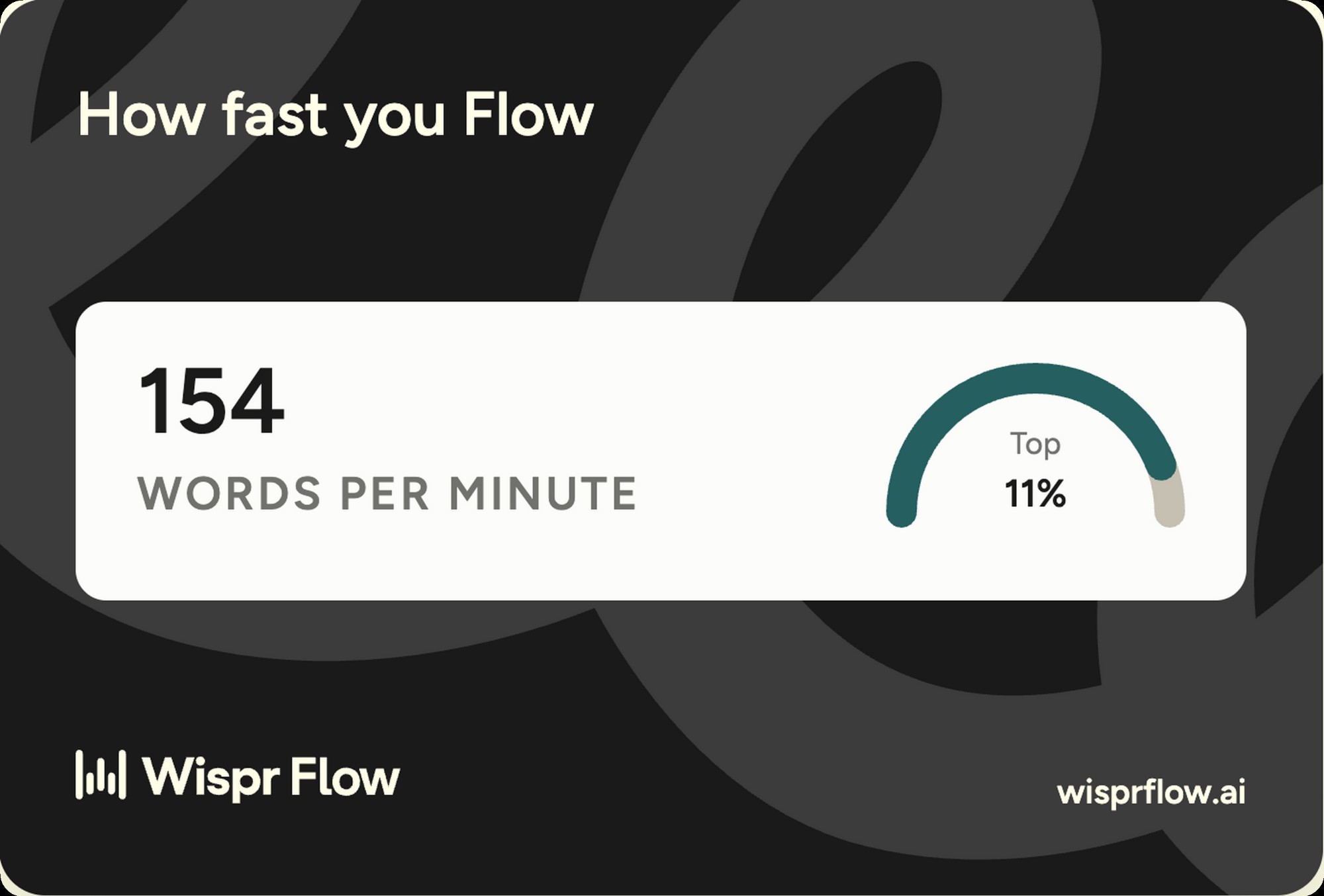
Both apps land in the same neighborhood on dictation speed once you're warmed up, somewhere between 140 and 165 WPM for natural speech. My Wispr Flow account sits at 154 WPM average across 90 days, which the app says puts me in the top 11 percent of users. Superwhisper hit similar numbers in my testing on the same input mix, though local models occasionally take a beat longer to return a longer clip. The real difference shows up on output quality. Wispr Flow's cleanup strips filler, false starts, and grammar issues before the text lands in the field. Superwhisper does this too, but only when you've configured a mode that does it. Out of the box, Wispr Flow ships further along the editing curve.
AI cleanup and post-processing
Wispr Flow, out of the box
Auto context detection plus aggressive cleanup beats blank-slate configuration for most users. Superwhisper can match it, but only with setup work.
This is the criterion where the two products feel most different in daily use. Wispr Flow watches what app you're in and shifts tone accordingly. More formal in Gmail, more casual in iMessage, more literal in code editors. Superwhisper offers the same outcome through its mode system, but the modes are something you have to build. The Wispr Flow approach trades configurability for immediacy. The Superwhisper approach trades immediacy for control. If you want the right answer in week one, Wispr Flow. If you want a perfectly tuned answer in month three, Superwhisper.
Privacy and data handling
Superwhisper, by a wide margin
Local Whisper models on Apple Silicon. Audio never leaves your machine. The only correct answer for confidential work.
If your work involves NDAs, client confidentiality, health information, financial data, or anything you wouldn't send to a third-party SaaS, the privacy criterion ends the conversation. Wispr Flow is a cloud service. Audio is uploaded, transcribed, and cleaned in their infrastructure. That's fine for most users, and the company runs a standard SaaS data posture. Superwhisper, with local models loaded, doesn't move your audio at all. The transcription happens on your Mac's Neural Engine. You can layer in cloud models when you want higher accuracy on hard audio, but the default is local. That's a meaningful difference for lawyers, doctors, therapists, and anyone doing client work where data flow matters.
Customization and power-user depth
Superwhisper, with no contest
Per-mode prompts, custom dictionaries, model swapping, and shortcut-driven mode switching. Wispr Flow doesn't expose this surface area.
Superwhisper treats dictation like a configurable pipeline. You build modes for different contexts, each with its own model, prompt, post-processing rules, and even output format. Want code dictation that respects camelCase? Build a code mode. Want journaling that captures voice tone without cleanup? Build a journal mode. Want meeting notes that auto-format into bullets? Build a notes mode. Wispr Flow doesn't expose this surface area, by design. It detects context and applies sensible defaults. For most users, the defaults are right. For users who want to shape the tool to a specific workflow, Superwhisper is the only one of the two that lets you do it.
A concrete example from my own testing. I built a Superwhisper mode for client briefs that capitalizes brand names from a custom dictionary, drops filler words aggressively, and formats output into short paragraphs. After about an hour of tuning, the output was cleaner than what Wispr Flow produces by default. The catch is that I had to know what I wanted, build the prompt, test it, and iterate. Wispr Flow gets you 80 percent of the way there with no setup. Superwhisper gets you to 100 percent if you put the work in. That's not a knock on either product. It's the design philosophy talking.
Cross-platform, the silent decider
If you work on both Mac and Windows, this section is the whole comparison. Wispr Flow ships the same product on both operating systems, plus iOS and Android. Superwhisper is Mac-only with an iOS companion. For a Mac-exclusive operator, that doesn't matter. For anyone who switches between machines, has a Windows laptop for travel, or runs a team where not everyone is on Apple hardware, Wispr Flow is the only viable choice. This is the kind of consideration that looks small on a spec sheet and decides the buying call in practice. Buy a tool that fits your real stack, not your idealized one.
One nuance for teams. If half your org is on Mac and half is on Windows, deploying Superwhisper means buying a second dictation product for the Windows side. Wispr Flow on Teams is one billing line, one admin surface, and one product to support across the org.
Pricing math, head to head
Both products are priced cheap relative to what they save. The math is small whether you pick the more expensive or the less expensive option. That said, the gap between them is real, and worth understanding before you commit.
| Plan | Wispr Flow | Superwhisper |
|---|---|---|
| Free | $0, ~2,000 words / week | $0, local models with usage limits |
| Paid monthly | ~$15 / month | $8.49 / month |
| Paid annual | ~$144 / year (~$12 / mo) | $84.90 / year (~$7 / mo) |
| Annual savings | ~20% off monthly | 2 months free (~17% off) |
| Team plan | Per-seat, custom | Business tier, contact |
The headline. Superwhisper is roughly half the price of Wispr Flow on annual billing. Whether that delta matters depends on the value you're getting back. For a working operator who dictates volume into AI tools, the $60 a year price gap is recovered inside one productive afternoon. For a privacy-sensitive user who's optimizing on data flow more than throughput, the lower price is a small bonus on top of the bigger privacy win. Don't pick on price unless price is the only variable. It rarely is.
For the full math on whether either is worth paying, the Wispr Flow pricing breakdown walks through the break-even calculations at different hourly rates and dictation volumes. The same logic applies to Superwhisper at its lower price point, with a faster payback because the subscription is smaller. If your real question is dictation versus meeting notes, read Wispr Flow vs Granola instead.
Where each one falls short
No tool is perfect. Both of these have real gaps. Here's the honest list after testing both against the same input mix.
Wispr Flow limitations
- Cloud-only architecture. Your audio is uploaded for transcription. Standard SaaS data posture, but a non-starter for confidential workflows.
- Less configurable than Superwhisper. The AI cleanup is good, but you can't tune it per context the way Superwhisper modes let you.
- Higher price ceiling. Roughly twice the annual cost of Superwhisper at sticker, though promotions narrow the gap.
- Free tier word cap is real. 2,000 words a week sounds like a lot until you spend a day dictating into AI prompts.
Superwhisper limitations
- Mac-only on desktop. No Windows support, no Linux, no web. If your stack isn't all Apple, this is the disqualifier.
- Setup work to match Wispr Flow's defaults. The mode system is powerful, but blank by default. You have to invest time to make it sing.
- Smaller team behind the product. That's not a knock on quality, but the release cadence and support depth aren't comparable to a larger venture-backed team.
- Local models occasionally lag on long clips. The trade-off for privacy is sometimes a beat of latency that you wouldn't see on the cloud option.
Shared limitations, both apps
- Neither handles strong accents perfectly. If English isn't your first language and your accent diverges from US English, both will have rough patches on certain words.
- Background noise is the universal enemy. A cafe with espresso machines breaks both apps the same way.
- Custom vocabulary takes work. Brand names, technical jargon, and niche terms need to be added to both products' dictionaries to land cleanly.
When to pick each, honestly
The decision tree at the top of this page is the short version. Here's the longer one, written for the realistic working operator who's deciding between two real products.
Pick Wispr Flow if
- You dictate volume into AI prompts. The cleanup is purpose-built for natural-language input and saves real editing time.
- You work across Mac and Windows. The cross-platform reach makes this an easy call.
- You want the lowest-friction install-to-value experience. Open the app, set the shortcut, dictate into Slack within two minutes.
- You're optimizing for time saved, not data flow. The cloud architecture is a non-issue for most workflows, and the cleanup quality is worth the cost.
Pick Superwhisper if
- Your work involves client confidentiality, NDAs, health information, or anything you'd rather not send to a SaaS.
- You want a configurable dictation stack with per-context modes. The depth here is the standout feature.
- You need offline dictation. Local Whisper models work without internet, which Wispr Flow can't do.
- You're Mac-only and want the lower annual price. The math at $84 a year is hard to argue with for a daily-driver tool.
The bottom line
This isn't a "one product is bad" comparison. Both are excellent at what they do. The right answer depends on what you're optimizing for. If I had to pick one for the majority of working professionals on a Mac, it's Wispr Flow. The combination of AI cleanup quality, cross-platform reach, and zero setup gets most people to value the fastest. If I had to pick one for privacy-sensitive users, Mac-only power users, or anyone who wants a deeply configurable tool, it's Superwhisper. The local-by-default architecture and mode system are real differentiators, not marketing copy.
For me, Wispr Flow is the daily driver. 90 days of real use, 107,125 words dictated, and the app earned its place before I applied to be an affiliate. That's the honest answer. Your input mix, your platform stack, and your privacy posture may push you to the other side of this decision. That's fine. Both products are good enough that you can't pick wrong.
The smart move for almost everyone reading this. Install both free tiers tonight. Use them in parallel for a week on real work. Friday afternoon, the right answer will be obvious, and you'll have skipped the entire research phase that this post is meant to replace.
Ready to try? Start free on Wispr Flow, or check out Superwhisper if privacy is the deciding factor.
Built something worth testing?
I review products hands-on and publish the verdict either way. If you make something my readers should know about, I want to see it.
Pitch your product