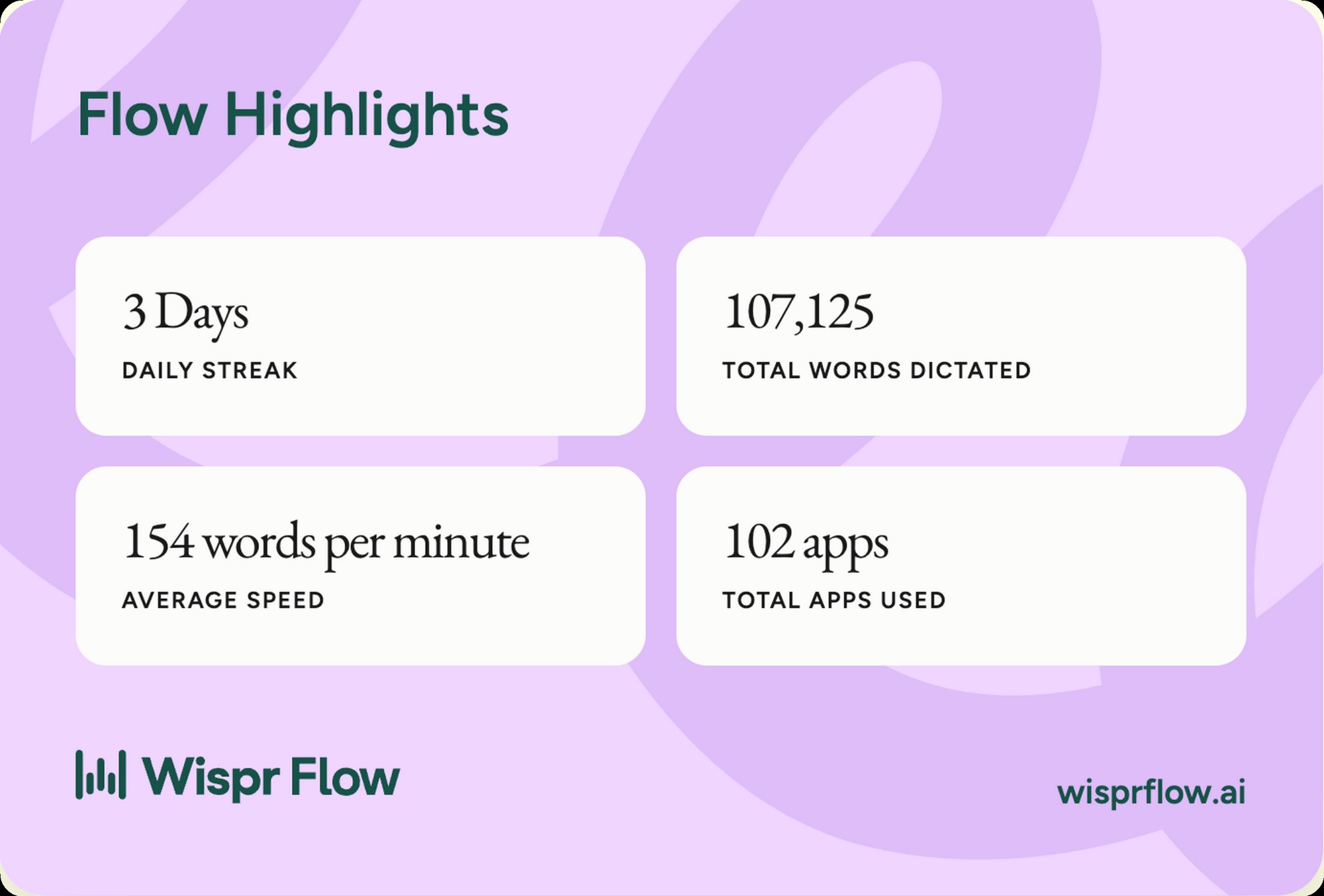
I've dictated 107,125 words into Wispr Flow over the last 90 days. The app's own dashboard puts me in the top 11 percent of users by speed, at 154 words per minute average. 62 percent of that volume, around 5,471 individual dictations, went straight into AI prompts. Most reviews of a dictation app come from someone who tested it for a week. The numbers below are what 90 days of real working use actually look like.
This is the dictation-software side of the voice-AI cluster on this site. The hardware-capture side lives at the Pocket AI review, the Pocket vs Plaud comparison, and the Plaud Note review. Wispr Flow doesn't compete with either. Pocket and the Plaud Note capture conversation. Wispr Flow turns your voice into typed text in any app on the OS. Different category, same content lane, and the two surfaces together cover almost every input you'd make in a working day. If you're weighing one against the other, I wrote both matchups out, Wispr Flow vs Plaud and Wispr Flow vs Pocket. For the wider category, start with the guide to AI dictation.
Wispr Flow, the daily driver
154 WPM average, 107,125 words dictated, 62 percent of it landing in AI prompts. The dictation app I'd buy again without thinking about it.
What's changed since this review, September 2026 update
I pulled my account numbers in May 2026 and the product has moved since. Wispr shipped a run of updates through August and September, and two of them change the buying decision. Here's the short version, with links to Wispr's own posts so you can read the claims where they were made.
Canto, the new engine. On September 17, 2026, Wispr posted that Flow now runs on Canto, the first speech model the company built itself. Wispr says Canto had the lowest word error rate of every model it tested on real-world English recordings from more than 2,300 speakers, including models from Google, OpenAI, AssemblyAI and Deepgram. The Series B post says error rates in noisy conditions fell from more than 30 percent of words to between 5 and 10 percent, and projects 30 to 35 percent fewer edits in everyday use. Those are Wispr's numbers, not mine. Every accuracy observation in this review was made before Canto landed, on the Whisper-class engine Flow ran until then.
Notetaker on Windows. Notetaker launched on Mac on August 5 and reached Windows on September 15, 2026, with Outlook calendar integration in the Windows build. Meeting transcription now covers 21 languages, and Flow imports existing transcripts from Otter as well as Granola, speaker names intact. It's still desktop only, so the iOS and Android apps do dictation and not meeting capture.
A Growth plan. Self-serve Growth plans shipped August 28, 2026 at $23 a month, or $18 a month billed annually, and they include unlimited Notetaker access. That's a new rung between Pro and Enterprise, and it's the one to price out if meetings are the reason you're buying rather than dictation.
The money. Wispr raised $280 million at a $2 billion valuation on August 17, 2026 in a round led by Menlo Ventures, bringing total funding to $361 million. TechCrunch covered the round. The company says 60 billion words have been written with Flow. On the reliability side, the July 9, 2026 changelog put dictation uptime at 99.9 percent over the prior weeks and latency down 30 percent since the start of the year.
What this means if you're buying today. The engine underneath the app isn't the one I tested, and by Wispr's own account it's better in noisy rooms, so read my accuracy notes as a floor rather than a ceiling. Notetaker on Windows removes the platform caveat that used to send Windows buyers elsewhere. And if you want the meeting side uncapped, the plan to look at is Growth, not Pro. Wispr's own plan page carries the live numbers.
Wispr Flow at a glance
Wispr Flow is a voice dictation app for Mac, Windows, iOS, and Android. On the desktop it runs in your menu bar. You hold down a hotkey (fn by default), talk into your laptop mic, release the key, and Wispr Flow types cleaned-up text into whatever app is active. The AI cleanup is what separates it from native dictation. Filler words get stripped, sentences get punctuated, and a custom dictionary learns your jargon over time. The app doesn't care what's in focus. Slack, Cursor, Claude Code, Notion, Gmail, Notes, anywhere a text cursor exists, Wispr Flow can type into it.
- PlatformsmacOS, Windows, iOS, Android
- TriggerHotkey, fn by default, fully configurable
- Transcription engineCanto, Wispr's own speech model since September 17, 2026, cloud-processed
- AI cleanupFiller removal, grammar, punctuation, custom vocabulary
- Custom dictionaryYes, 446 dictionary fixes on my account in 90 days
- App coverageEvery text field on the OS, 102 distinct apps in my data
- LatencySub-second on short prompts, scales with dictation length
- Free tierYes, 2,000 words a week on desktop, 1,000 a week on mobile
- PricingFree, Pro, Growth, and Enterprise, current pricing on wisprflow.ai
How Wispr Flow works
The loop is four steps. Press the hotkey. Talk. Release the hotkey. Cleaned text appears in the active app. The whole cycle for a one-sentence message takes under two seconds. For a 200-word prompt, it takes about as long as you take to say it, plus another second of processing. Native dictation runs a similar loop. Wispr Flow's loop is faster and tighter because the cleanup happens server-side instead of letting half-finished filler words land on the page.
The cleanup is the differentiator. Wispr Flow strips out the ums and uhs you didn't notice you were saying. It adds the punctuation the dictation engine wouldn't normally guess. It infers paragraph breaks from your pacing. My own account shows 3,155 corrections made by Flow in 90 days, broken into 2,709 word-level corrections and 446 custom dictionary entries. That's roughly 35 corrections a day, every day, that I didn't have to make by hand. The savings compound.
Who Wispr Flow is for
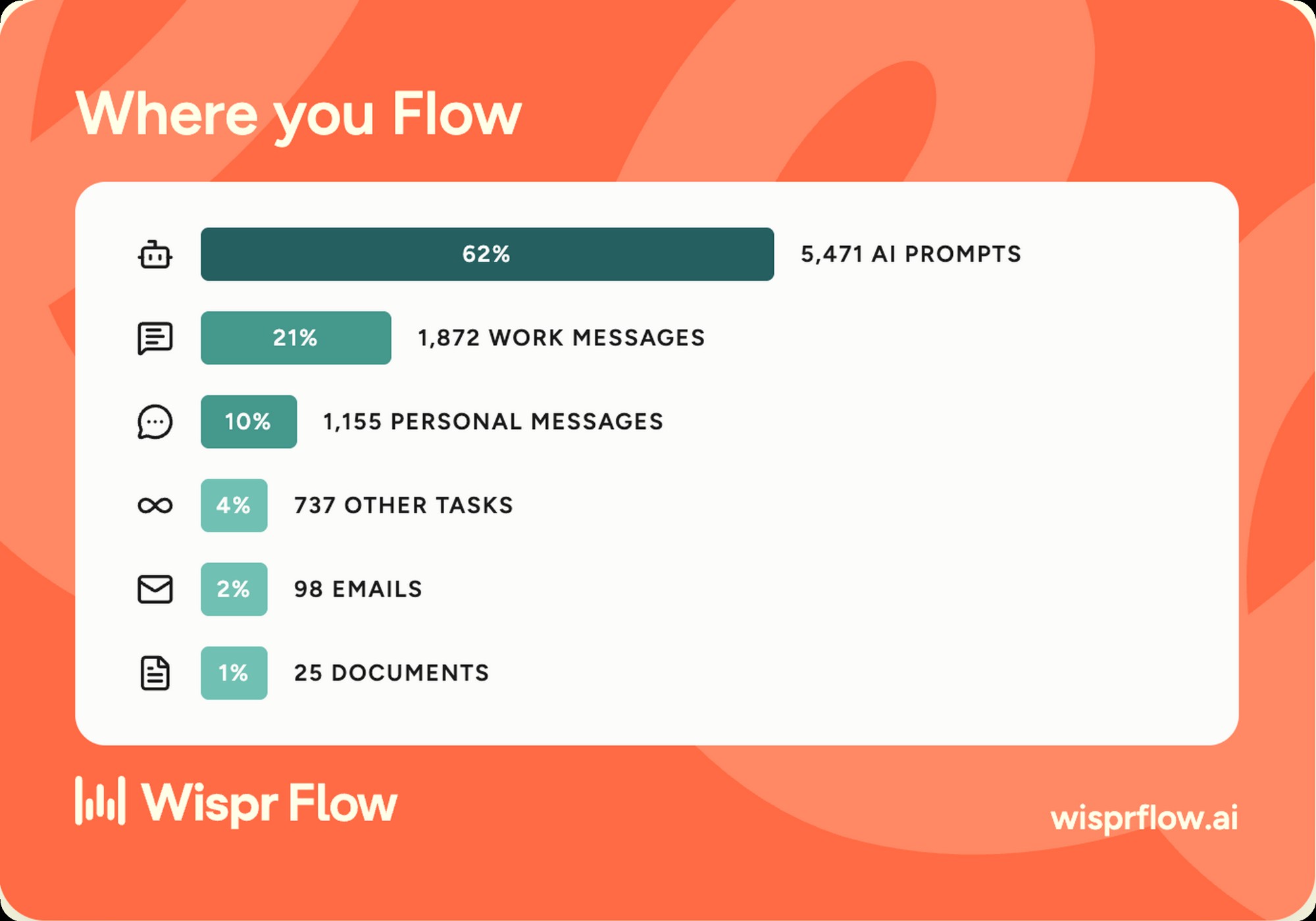
If you run Claude Code, Cursor, or any LLM front-end, Wispr Flow is the workflow tool you didn't know you needed. 5,471 of my 90-day dictations, 62 percent of all volume, went into AI prompts. Long prompts written by voice are more natural than long prompts written by hand. You think in spoken sentences, not in punctuated paragraphs. Wispr Flow lets you talk through a request the way you'd brief a colleague and end up with a clean prompt instead of a messy stream of consciousness. For anyone whose working day is a stack of LLM conversations, this is the killer use case.
If you're a solo founder or single operator running comms across a dozen apps a day, Wispr Flow earns its keep in raw message throughput. My distribution over 90 days breaks down to 5,471 AI prompts, 1,872 work messages, 1,155 personal messages, 737 other tasks, 98 emails, and 25 documents, across 102 distinct apps. That's the working-day surface area dictation has to cover. Wispr Flow's any-text-field promise actually holds. I've used it in Slack, iMessage, Linear, Gmail, Notion, Cursor, Claude Code, Notes, and a long tail of one-off forms and dialogs. It works.
Wispr Flow isn't for everyone. If you type 200 words a day, the free tier covers you and the paid tier is overkill. If you write code by voice, you're going to fight Wispr Flow on every bracket, parenthesis, and special character. Native code completion is the better answer there. If you work under a privacy regime that doesn't allow cloud-based voice processing, this isn't your tool. Be honest about your input profile before you pay.
The speed test, in my own data
The baseline matters. Average office workers type around 40 to 50 words per minute depending on which study you pull. Strong touch typists land between 75 and 100. The fastest English-language professional typists clear 120. My Wispr Flow account averages 154 WPM, which the app's own scoring puts in the top 11 percent of users. That's not a marginal improvement. It's a category change.
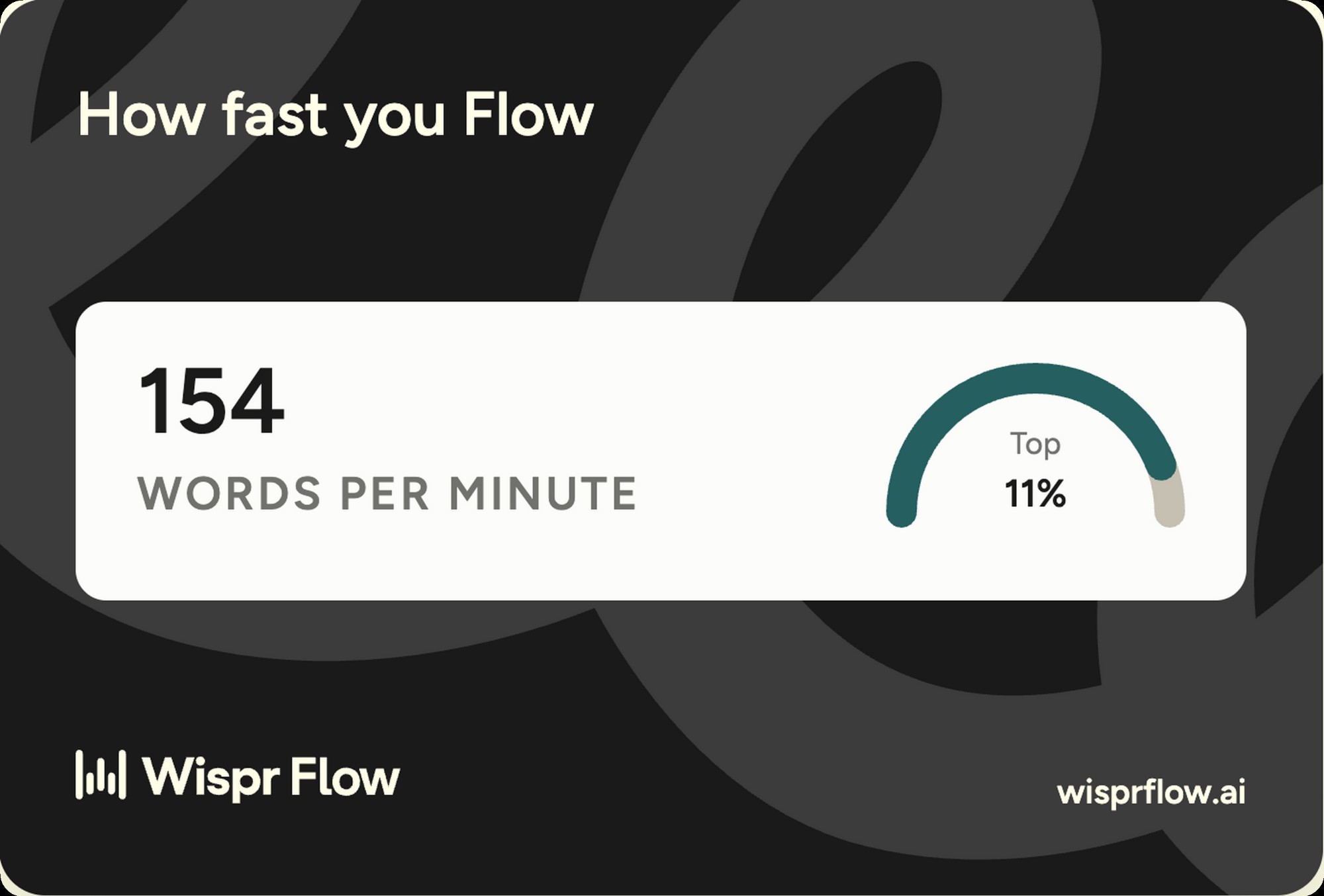
The math on hours saved is the part most reviews skip. Over 90 days I dictated 107,125 words. At a typing baseline of 60 WPM, the same volume would have taken about 30 hours. At Wispr Flow's 154 WPM, it took about 11.6. That's 18 hours back over the quarter, or roughly an hour and a half a week. At a $200 per hour billable rate, the subscription pays for itself in the first day of any month. The compounding is the point. Voice input doesn't beat typing on a single message. It beats typing across thousands of them.
Voice input isn't a typing replacement. It's a typing multiplier. The people who win with Wispr Flow aren't the ones who stop typing. They're the ones who keep typing when typing is faster (single words, short replies, code) and dictate when dictation is faster (long prompts, full paragraphs, anything they'd say out loud to a colleague).
Wispr Flow plus Claude Code, the workflow that decided it
This is the section that explains why I run Wispr Flow and not native dictation. 5,471 of my 90-day dictations went into AI prompts. That's 62 percent of all volume. The pattern is consistent enough that I'd argue Wispr Flow plus Claude Code is a single integrated workflow, not two tools that happen to live on the same machine. Voice is the right input shape for an LLM prompt. You think in conversational language. The model parses conversational language. Typing the same conversational language by hand is the friction step that doesn't need to exist.
Mechanically, the workflow is this. Open Claude Code. Position the cursor in the prompt input. Press fn. Talk through the request the way I'd brief a teammate, 30 to 90 seconds typically. Release fn. The cleaned prompt appears. Press enter. Compared to typing the same prompt, I save somewhere between two and four minutes per long prompt. Compared to writing a short prompt and then iterating with the model to clarify, I save a full round-trip because I can say everything I mean the first time. Multiply by 5,471 prompts. The compounding is real, not theoretical.
I wrote up the broader Claude Code workflow in the Claude Code skills writeup. The short version, Wispr Flow plus Claude Code is the voice-side complement to MCP-server integrations on the capture side. Once both layers are voice-native, the working day reshapes around speaking the request and reading the output. The keyboard becomes the secondary input, not the primary one. That's not where I expected to land 12 months ago. It's where I am now.
Accuracy and the learning loop
Accuracy on standard conversational English is excellent. Mine sits in the high-90s percent from what I can tell by eye. Names trip it up. Technical jargon trips it up. Brand names with unusual capitalization trip it up. So do mid-sentence numbers when I run them together. I made those observations on the Whisper-class engine Flow ran before September 17, 2026, when Wispr moved the app onto Canto, so treat them as the older baseline. What the app does on top of whatever engine is underneath is fix the misses faster than I would on my own.
The learning loop is the part that matters. My voice profile (the app labels mine "Directive Driver") plus the custom dictionary makes the system get better the more I use it. 3,155 fixes in 90 days, broken into 2,709 word corrections that I made manually plus 446 dictionary entries Flow learned from those corrections. The dictionary entries are the ones that compound, because every future dictation of the same word lands correct without me having to fix it again.
The edge cases worth knowing. Brand names like "mrktcorrect" or "Granola" took multiple corrections before they stuck. Technical terms like "MCP" or "Claude Code" learned inside a week. Made-up product names take longer. Numbers in long sequences (phone numbers, version strings, dates) need a visual check before sending. If you take a lot of multilingual calls or write in non-English text fields, run the free tier in your real input mix before paying.
Where it works, where it doesn't
The "any text field" promise actually holds. My account shows 102 distinct apps used with Wispr Flow over 90 days. The volume distribution is the interesting part. 62 percent into AI prompts, 21 percent into work messages (Slack, iMessage, Linear), 10 percent into personal messages, 4 percent into other tasks, 2 percent into emails, and 1 percent into documents. The thing that surprised me is how little of my dictation goes into long-form documents. Wispr Flow's value is in the messy long tail of small inputs, not in writing essays.
The honest gaps. Code editors with aggressive autocomplete fight Wispr Flow. Spreadsheet cells are clunky because cell focus and dictation triggers don't play perfectly together. Some Electron apps need a click to focus before the dictation engine catches them. None of these are dealbreakers. They're the kind of friction you stop noticing after a week, but they exist.
The Notetaker update, Mac and Windows
The biggest change since this review first ran. On August 5, 2026, Wispr Flow shipped Notetaker, an AI meeting notes feature built into the same app and the same subscription. It records meetings from your computer's audio without joining the call as a bot, shows a live transcript with speaker identification, and writes up decisions, deadlines, and action items afterward. It works on Google Meet, Zoom, Microsoft Teams, Slack huddles, and in-person conversations, and the free plan includes limited access. Windows shipped September 15, 2026, with Outlook calendar integration, so the Mac-only caveat is gone. Notetaker stays desktop only, and the iOS and Android apps do dictation rather than meeting capture.
Three details worth knowing. It connects to Claude, ChatGPT, Gemini, and Cursor over MCP, so your meeting notes are readable from whatever AI assistant you already run. Meeting transcription covers 21 languages. And it imports existing transcripts in one step, from Granola since launch and from Otter since September 4, 2026, speaker names preserved, which drops the switching cost to nearly zero for anyone consolidating tools. This turns Wispr Flow from a dictation app into a dictation plus meeting notes bundle, and it changes the value math in the pricing section below.
I've put it head to head with Granola on real client calls. The full breakdown lives in Wispr Flow vs Granola, and the short version is that neither wins outright. Wispr Flow takes the bundle-per-dollar argument, Granola keeps the deeper meeting workflow. If you're weighing Flow against hardware that hears the room instead of the call, the two matchups are Wispr Flow vs Plaud and Wispr Flow vs Pocket.
Privacy and what gets sent where
Wispr Flow processes audio in the cloud. Your voice leaves your device. The transcription engine runs on Wispr's servers, the AI cleanup runs on Wispr's servers, and the cleaned text comes back over the network before it types into your app. Native macOS Dictation has an on-device option on Apple Silicon machines that doesn't send audio anywhere. SuperWhisper and MacWhisper run entirely on-device. Wispr Flow doesn't have that today.
What you can control. Training data opt-out exists in the settings. The custom dictionary is local to your account, not shared. Voice profile data sits on Wispr's servers as part of personalization. Read the Wispr Flow privacy policy before you install. The fine print is short and readable, which is more than I can say for most SaaS privacy policies.
The judgment call. For me, the trade is worth it. Most of what I dictate (AI prompts, work Slack messages, personal texts) already lives in cloud services with similar exposure profiles. The Wispr Flow processing layer isn't adding meaningful surface area to anything that was already cloud-native. If your inputs include privileged client data, board materials, healthcare records, or anything that would be a problem in a news article about a breach, run native dictation instead. Be honest about what you actually type before you commit.
What Wispr Flow gets right
- Speed. 154 WPM average on my account, top 11 percent of users.
- AI cleanup that strips filler and adds punctuation in real time.
- App coverage. Every text field on the OS, 102 distinct apps in my 90-day data.
- Learning loop. Voice profile and custom dictionary compound over time.
- Hotkey trigger that stays out of the way. fn by default, fully configurable.
- Dev workflow fit. 62 percent of my dictation goes into AI prompts.
- Free tier generous enough to validate the product before paying.
Where Wispr Flow falls short
- Cloud-only processing. No on-device option today.
- Subscription that compounds. Model hours saved against monthly cost before committing.
- Code symbols and bracket-heavy text remain a weak spot.
- Brand names and jargon need a week or two of corrections before they stick.
- Some Electron apps need an extra click to focus before dictation catches them.
Start with the free tier
The free tier covers light use without a card on file. Run it for a week before you commit. If you blow past the limit, you're already the buyer.
Wispr Flow vs native macOS Dictation
The comparison most reviewers skip. macOS Dictation ships free on every Mac. Anybody asking "should I buy Wispr Flow" is implicitly asking "why not stay on what's already on my laptop." Here's the honest answer.
| Decision | Wispr Flow | macOS Dictation |
|---|---|---|
| Cost | Subscription, free tier plus Pro, Growth, and Enterprise | Free, built into macOS |
| AI cleanup | Strips filler, adds punctuation, infers paragraphs | Minimal, raw spoken text |
| Custom vocabulary | Custom dictionary that learns from your corrections | Limited to system vocabulary |
| Speed | 154 WPM average in my data | Capped at engine throughput, no AI compaction |
| On-device option | Cloud only | Yes, on Apple Silicon |
| Best fit | Devs, solopreneurs, heavy AI prompt users | Casual users, privacy-sensitive workflows |
The honest read. Native dictation is enough if you dictate occasionally or work in a privacy-sensitive context. Wispr Flow earns its keep above the casual line, when dictation is a primary input and the AI cleanup is doing meaningful work on volume.
Native Dictation isn't the only rival worth weighing. The closest paid competitor is Superwhisper, the on-device Mac app that trades cloud AI cleanup for local privacy. I put the two head to head in the Wispr Flow vs Superwhisper comparison, with the full specs table, pricing math, and a verdict by use case. There's a head to head with ElevenLabs too, at ElevenLabs vs Wispr Flow.
Pricing and the cost math
Pricing on wisprflow.ai moves with promotions. Anything I quote here is a snapshot. As of September 2026, the shape is a free tier at 2,000 words a week on desktop and 1,000 a week on mobile with limited Notetaker access, a Pro plan at $15 a month or $12 a month billed annually, a Growth plan at $23 a month or $18 billed annually with unlimited Notetaker, and an Enterprise plan billed annually for organizations. Anyone with an education email gets 50 percent off Pro. Check the site for the current numbers before you commit. For the full break-even math, free vs Pro breakdown, and an hours-saved calculator, see the Wispr Flow pricing breakdown.
| Plan | Cost | Best for |
|---|---|---|
| Free | $0 | Validate the product. 2,000 words a week on desktop, 1,000 a week on mobile, with limited Notetaker access. |
| Pro | $15 per month, or $12 per month billed annually | Daily users. Devs, solopreneurs, and anyone whose working day involves more than casual typing. Half price with an education email. |
| Growth | $23 per month, or $18 per month billed annually | Anyone buying this for meetings. Unlimited Notetaker access sits on this tier, not on Pro. |
| Enterprise | Custom, annual billing | Small companies and agencies that want admin controls and shared billing. |
The cost-versus-value math is straightforward at any meaningful volume. Over 90 days I saved roughly 18 hours dictating instead of typing, against a Pro plan that runs about $45 over the same period. At any billable rate above $3 an hour, the subscription pays for itself. For anyone with a five-figure or six-figure income, the math is laughable in favor of paying. The harder calculation is for casual users dictating a few thousand words a month. There, the free tier covers it and the paid plan probably doesn't pay back.
The bottom line
Wispr Flow is the dictation app I run every day, 90 days in. 154 WPM average, 107,125 words dictated, 3,155 corrections made by Flow on my behalf. The category has matured past "voice as a novelty" into "voice as a working input." If you type for a living and your work involves any meaningful volume of AI prompts, this is the buy.
If not Wispr Flow, the honest alternatives. Native macOS Dictation for casual use, especially on Apple Silicon where the on-device option exists. SuperWhisper or MacWhisper for the local-processing crowd. The category has more than one good answer. Wispr Flow's edge is the AI cleanup and the learning loop, not the underlying transcription engine, which is similar across the field.
Want to see how Flow lines up against the rest of the voice stack? Wispr Flow vs Granola covers the meeting notes question. Wispr Flow vs Plaud and Wispr Flow vs Pocket cover the hardware side, and the AI dictation guide covers the whole category.
Wispr Flow, the daily driver 90 days in
154 WPM. 107,125 words. 62 percent of it into AI prompts. The dictation app I'd buy again without thinking about it.
Wispr Flow, 4.5 out of 5
The dictation app I run every day, 90 days in. 154 WPM average, 107,125 words dictated, 3,155 fixes made by Flow on my behalf. The single sharpest reason it earns this rating is the AI prompt workflow, which is the killer use case for anyone running Claude Code or any LLM front-end.
Half a point off for the cloud-only processing model, which limits the privacy-sensitive use cases, and for the subscription that compounds against you if you don't actually dictate enough volume to earn it back. Neither is a dealbreaker for the user this product is built for. Both are worth naming.
Built something worth testing?
I review products hands-on and publish the verdict either way. If you make something my readers should know about, I want to see it.
Pitch your product